Connect your LLM
Q-omics is a multi-omics analysis server for LLMs. Connect it once, then ask questions in natural language — your LLM resolves genes, drugs and lineages, then runs survival, correlation, association and normal-vs-tumor analyses across curated pan-cancer cohorts (TCGA / CCLE / CPTAC-class) and returns summary statistics with presentation-ready figures.
01Connect a client
Add the Q-omics server URL once and sign in — the tools then appear in every new chat. You do this once per client. Pick yours below.
-
Open the connector dialog. From the + menu at the bottom-left of the chat box — or your connector settings — choose Add connector → Add custom connector.

The + menu → Add connector → Add custom connector. Click to enlarge -
Paste the URL. Name it Q-omics, enter https://qomics.ai/mcp as the MCP server URL, then press Add. Leave Advanced settings empty — the client registers itself.

Name it Q-omics, paste the MCP URL, press Add. Click to enlarge -
Sign in (OAuth). A Q-omics window opens. Sign in with your Q-omics account; you return to Claude automatically.

Sign in to your Q-omics account (OAuth 2.1). Click to enlarge -
Turn it on in chat. In a new chat, open the + menu, go to Connectors and toggle Q-omics on.

Toggle Q-omics on — the 17 tools are now available in this chat. Click to enlarge
-
Start a new plugin. Open Plugins from the sidebar and press the + button at the top right of the page. Custom MCP servers need a Plus, Pro, Business or Enterprise plan.

Sidebar Plugins → + at the top right. Click to enlarge -
Fill in the server. Name it Q-omics, keep Connection on Server URL and paste https://qomics.ai/mcp. Set Authentication to OAuth — leave the advanced OAuth settings alone. Tick the acknowledgement, then Create.

Paste the Server URL, choose OAuth, then Create. Click to enlarge -
Connect. ChatGPT shows a consent card. Press Sign in with Q-omics.

Add Q-omics to ChatGPT → Sign in with Q-omics. Click to enlarge -
Sign in (OAuth). A Q-omics window opens. Sign in with your Q-omics account; you return to ChatGPT automatically.

Sign in to your Q-omics account (OAuth 2.1). Click to enlarge -
Use it in chat. In a new chat, open the + menu and pick Q-omics — it attaches to your message, then ask.

Pick Q-omics from the + menu, then ask. Click to enlarge
02Your first question
Connected? Don't start from a blank prompt. Copy one of these into your chat — each is a real question the tools answer end-to-end, and the last two are exactly what produced the figures further down this page.
One question in. A cross-cohort answer out.
Real Q-omics sessions: a single natural-language question, answered with multi-cohort statistics and a clean, presentation-ready figure — no spreadsheets, no scripting.
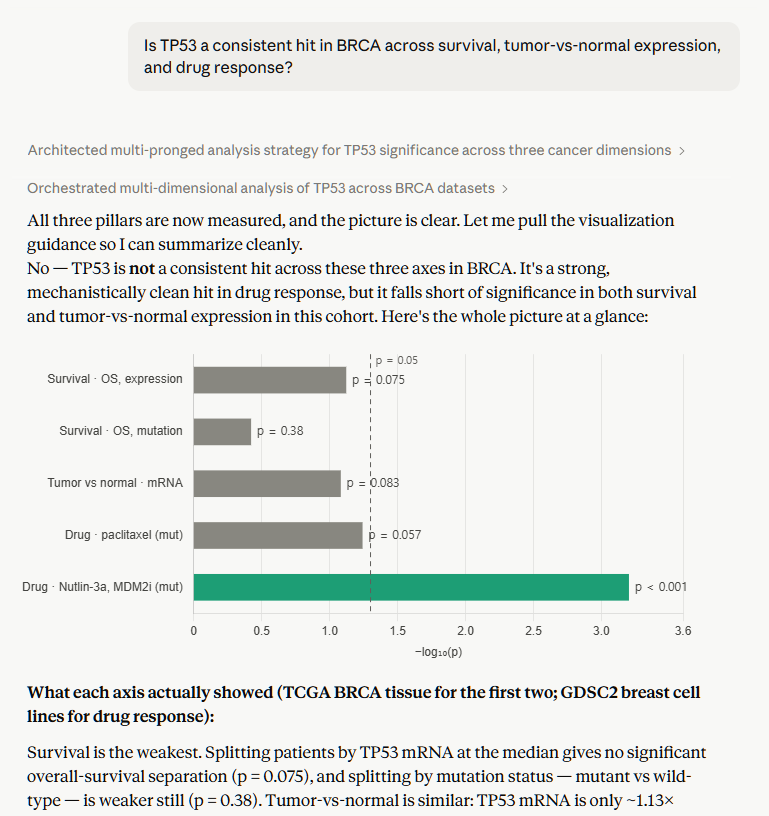
resolvesurvivalntbox
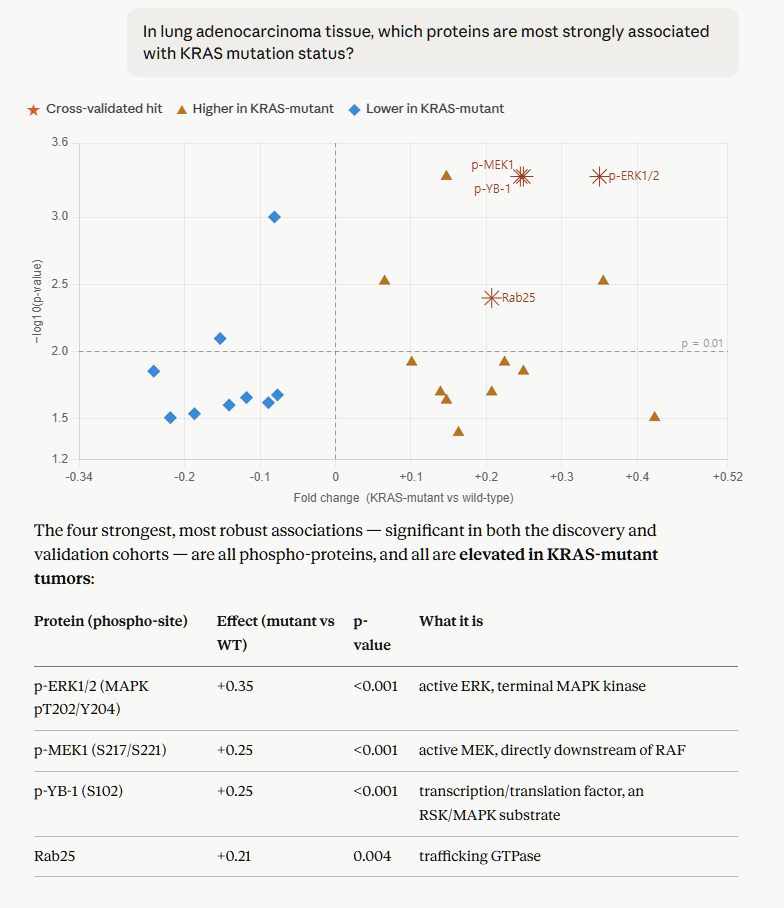
resolvecrosspql_run
03How the tools work
Seventeen read-only tools in two toolsets, each with its own rhythm — Guided
Analysis: resolve → analyze → re-verify; PQL: discover → run. Reach for Guided Analysis for
everyday questions; drop to PQL when you need something the fixed analyses can't express. Every tool is
annotated readOnlyHint: true.
Parameterized analyses for common questions. Fill a few slots, get summary stats + plot data back.
resolvesurvival · nt · box · correlation · crossbrowse · response · dig · neoantigen · slconsensus · pair_consensusA read-only verb-pipeline query language over the raw omics warehouse — arbitrary grouping, filtering, joins, aggregation.
pql_grammar · pql_schema · pql_examplespql_run04Auth & limits
Q-omics speaks the MCP 2025-11-25 spec over Streamable HTTP, authenticates via OAuth 2.1, and runs every call under a locked, read-only policy.
Authentication
| Flow | OAuth 2.1 — authorization code + PKCE (S256) |
|---|---|
| Client registration | Dynamic Client Registration (DCR) |
| Tokens | RS256-signed JWT (asymmetric: server signs, clients verify with the public key) |
| Account | A Q-omics account (sign in / sign up during the connect flow) |
Safety & limits
| Access | Read-only. No writes, DDL, or uploads are reachable through MCP. |
|---|---|
| Tool annotations | Every tool declares readOnlyHint: true + a title (MCP-required for directory listing). |
| Query guard | PQL compiles under EnginePolicy.locked() — per-request timeout, hard result-row cap; oversized requests are rejected, not silently truncated. |
| Rate limit | Not enforced during the preview stage — may change as Q-omics moves toward general availability. |
05Support & legal
Get help
| Contact | qomics@cbis.co.kr |
|---|---|
| Website | qomics.ai |
| Status | Report connection issues with your client name + version. |
Policies
| Privacy policy | Privacy policy |
|---|---|
| Terms of service | Terms of service |
| Data handling | De-identified cohort data only; queries are logged for abuse prevention. |