RNU6-256P

RNA expression — cross-omics
Cross-omicsRNA → FUNCTION-RNAPatientPairwise association · TCGA cohorts

Across TCGA patient cohorts, RNU6-256P RNA expression is significantly associated with the go_rna of many other GO terms, with 4,440 significant associations in total. STAD shows the largest number of these associations.

The most reproducible RNU6-256P-associated GO terms across cancer lineages are Establishment of protein localization to membrane, Neuron projection organization, and Negative regulation of cell projection organization. Each is linked with RNU6-256P in more than 3 cancer types. Because this analysis shows association rather than direction, both RNU6-256P-to-partner and partner-to-RNU6-256P results are reported.

Each partner links to its own Q-omics profile. The box plot shows the strongest example, Establishment of protein localization to membrane grouped by RNU6-256P-low versus RNU6-256P-high in STAD.

RNA expression associated GO terms by consensus

Ranked by combined sampling and lineage consensus. X-score (RNU6-256P→partner) and Y-score (partner→RNU6-256P) are standardized regression coefficients; both directions are reported because the association is undirected. p-values are from the association test.
LineagePartner GO termX-scoreY-scorep(X)p(Y)Sampling consensusLineage consensus
STADEstablishment of protein localization to membrane →+0.157+0.108<.001.00134
STADNeuron projection organization →+0.090+0.052<.001.00434
STADNegative regulation of cell projection organization →+0.106+0.104<.001<.00134
STADRegulation of fat cell differentiation →+0.103+0.113<.001<.00134
STADAerobic respiration →+0.192+0.103<.001<.00134
STADNucleoside triphosphate biosynthetic process →+0.189+0.114<.001<.00134
Each partner links to its Q-omics profile. Showing the 6 strongest of 4,440 associations by consensus.

Establishment of protein localization to membrane by RNU6-256P expression — STAD
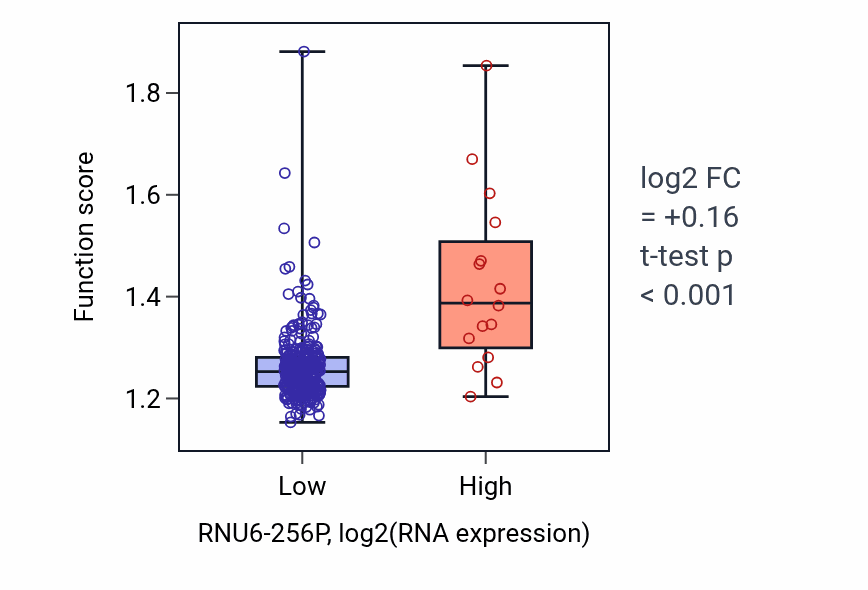
Box plot of Establishment of protein localization to membrane in RNU6-256P-low vs RNU6-256P-high samples in STAD.

Explore this box plot interactively →

Exploration